
We’re excited to announce that Preauthorization is now available in version 2.2 of the Scotiabank Payment Gateway for WooCommerce plugin.
Preauthorization gives Caribbean merchants more flexibility and protection during fulfillment — especially when the final total can change (deliveries, substitutions, deposits, weight-based items, and more).
In short: you can reserve (authorize) funds at checkout, then capture the final amount later when you’re ready.
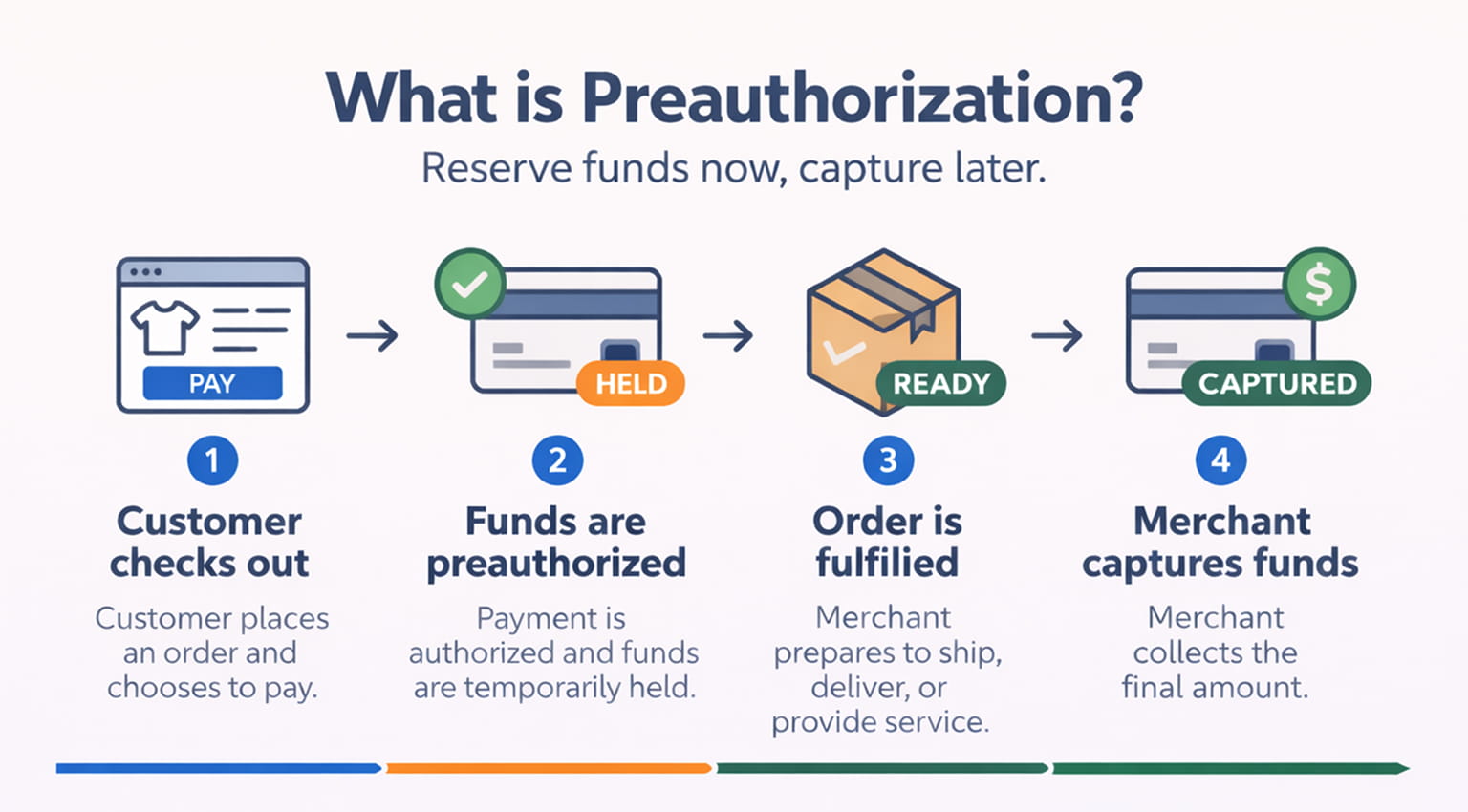
What is preauthorization?
Preauthorization (also called “authorize-only”) is a payment flow where:
- The customer completes checkout as normal.
- Their card is authorized for the amount (a temporary hold is placed).
- The merchant later captures the funds once the order is confirmed or fulfilled.
Customers typically see this as a pending transaction/hold on their card until the payment is captured or the authorization expires. Holds often remain for several days depending on card rules and issuer behavior.
What’s new in v2.2
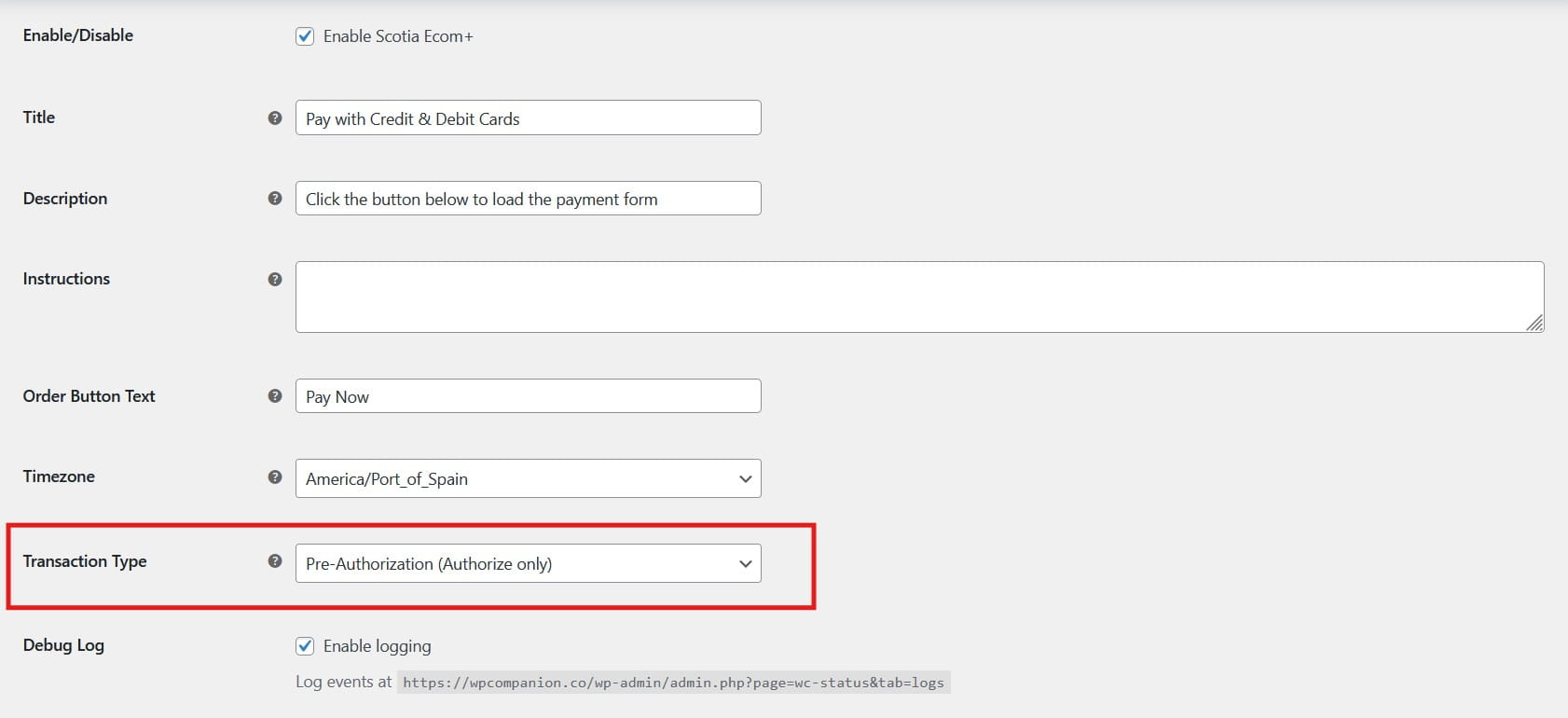
Version 2.2 introduces a new option that allows you to:
✅ Preauthorize at checkout (reserve funds)
✅ Capture later when your order is ready (collect the funds)
✅ Capture partially (capture less than the authorized amount)
✅ Automatically release the remaining amount after capture (single capture supported)
This makes v2.2 a major upgrade for merchants who need more control and fewer payment headaches during real-world fulfillment.
Why preauthorization is a big deal for Caribbean merchants
In the Caribbean, payment and fulfillment workflows often don’t fit “perfect totals at checkout.” Preauthorization is designed for reality:
- Substitutions are common (grocery/FMCG)
- Inventory changes happen mid-order
- Delivery fees may change by location
- Service businesses often collect deposits first
- Merchants want to confirm funds before dispatching
With preauthorization, you reduce the chances of:
- Taking an order and later discovering the card can’t be charged
- Needing to cancel and ask the customer to pay again
- Losing time managing payment issues manually
A standout feature: Partial Capture (Single Capture)
Scotiabank’s gateway supports partial capture, which means you can capture less than the authorized amount when the final order total changes.
How it works in v2.2 (important details)
- ✅ Single capture only (you capture once)
- ✅ If you capture less than the authorized amount, the remaining amount is automatically released
Examples where partial capture helps
- A grocery order is preauthorized for $500, but two items are out of stock → you capture $455 and the rest is released.
- An appliance delivery is preauthorized including a delivery fee estimate → you capture the final total after delivery is confirmed.
How long do you have to capture funds?
Preauthorizations are time-limited — merchants should capture as soon as the final total is confirmed.
Since capture windows can vary by card brand, issuer, and merchant category, a commonly used “rule of thumb” is that authorization holds are often valid for several days (around ~7 days on average) before they expire.
Best practice:
- Capture as soon as the order is fulfilled/confirmed
- If the authorization expires before capture, the customer may need to re-authorize payment
Note: We’ll update this section with Scotiabank-specific guidance once confirmed, but the above timeframe is a practical average for planning.
Who benefits most from preauthorization in the Caribbean?
Here are the top industries in the Caribbean where preauthorization is especially valuable:
1) Grocery, FMCG, and on-demand delivery
- Substitutions, variable-weight items, and stock changes are common.
2) Restaurants and catering
- Deposits and final totals can change based on headcount, add-ons, or menu changes.
3) Hotels, guesthouses, villas
- Ideal for deposits and securing bookings (and in some cases, security holds depending on process).
4) Car rentals
- Reserve funds upfront, capture final charges after rental completion.
5) Appliance/electronics delivery and installation
- Capture after delivery or installation is completed.
6) Medical, dental, aesthetic services
- Use for booking deposits, then capture once service is provided.
7) Events, venues, entertainment
- Deposits and balance payments become easier to manage.
8) Hardware and building supplies
- Partial fulfillment and backorders are common; totals may adjust.
Getting started with preauthorization in v2.2
Step 1: Update the plugin
Update to version 2.2 of the Scotiabank Payment Gateway for WooCommerce Plugin.
Step 2: Enable Preauthorization in settings
In your WooCommerce payment settings, select the new payment action that enables preauthorization.
Step 3: Test in sandbox first
Run a few test transactions to confirm:
- Authorization is successful
- Your order flow matches your fulfillment process
- Captures behave as expected
Step 4: Capture the funds when ready
When the order is ready, capture the final amount.
FAQs
What will customers see?
Customers may see a pending hold on their card for the authorized amount until:
- you capture the funds, or
- the hold expires naturally
Customers will also see their order on your website as On-Hold until the funds are captured.
Can I capture only part of the amount?
Yes. Partial capture is supported, but only one capture can be performed. After capture, any remaining authorized amount is automatically released.
What happens if I don’t capture in time?
If the authorization expires before capture, you may need the customer to authorize again (a new payment attempt).
Is this the same as a refund?
No. Preauthorization is about reserving funds before charging. Refunds happen after a charge is completed.
(Refunds inside WooCommerce are on our roadmap as Scotiabank’s REST API expands what we can offer.)
What’s next on the roadmap
Scotiabank’s REST API access opens the door for more powerful features, including:
- Refunds from within WooCommerce
- Captures managed directly in WooCommerce (expanded workflows)
- Tokenization and saved cards
- Future compatibility with subscription-based payments
If you’re a merchant who needs recurring billing or advanced payment workflows, keep an eye on upcoming releases. Cheers!